Calculating Slot Leadership
Challenge | If you operate a stake pool in a Testnet environment, then use the Testnets Faucet to receive a delegation to the pool. Receiving a delegation ensures that the pool is elected to produce blocks regularly, facilitating development and testing. |

As a stake pool operator, you aim to keep the stake pool that you operate online at all times. However, knowing in advance when the stake pool is elected to produce blocks allows you to schedule required maintenance, for example, without missing an opportunity to produce a block.
Using Cardano CLI, you can query the slot numbers and Coordinated Universal Times (UTCs) when a stake pool that you operate is elected to produce blocks in the current epoch. In the Pre-production Testnet and Mainnet environments, within 36 hours of the next epoch starting you can also query the slot numbers and times when the stake pool is elected to produce blocks in the next epoch. In the Preview Testnet environment, you can query the slot leadership schedule for the next epoch within 6 hours of the next epoch starting.
Figure 1 illustrates how the Cardano protocol shares with stake pool operators the slot leadership schedule for block production, as well as how stake pools prepare blocks.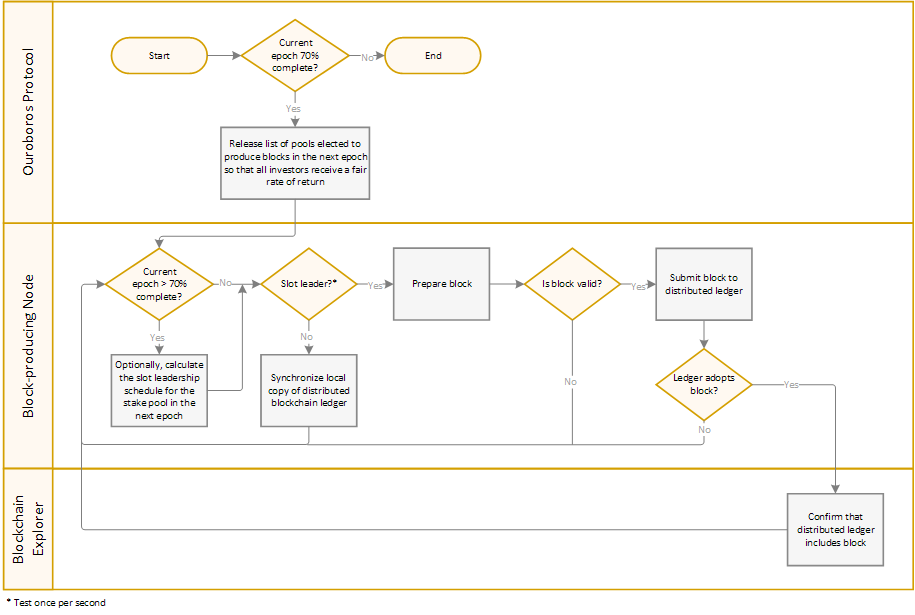
Note | Cardano CLI commands throughout the How to Set Up a Cardano Stake Pool guide may use the |

To query the slot numbers and times when a stake pool you operate is elected to produce blocks in the current epoch:
- Using a terminal window on the block-producing node, type:cardano-cli conway query leadership-schedule \--cardano-mode \--mainnet \--genesis $NODE_HOME/shelley-genesis.json \--stake-pool-id $(cat $NODE_HOME/stakepoolid-bech32.txt) \--vrf-signing-key-file $NODE_HOME/vrf.skey \--current
Note | Depending on available computing resources, the |
To query the slot numbers and times when a stake pool you operate is elected to produce blocks in the next epoch:
- Using a terminal window on the block-producing node, type the following command when the current epoch is more than 70 percent complete:cardano-cli conway query leadership-schedule \--cardano-mode \--mainnet \--genesis $NODE_HOME/shelley-genesis.json \--stake-pool-id $(cat $NODE_HOME/stakepoolid-bech32.txt) \--vrf-signing-key-file $NODE_HOME/vrf.skey \--next
Important | Do NOT share the slot leadership schedule for the stake pool that you operate on Mainnet publicly. |

The following example shows you the JSON output format of a query leadership-schedule command:
[
    {
        "slotNumber": 94264420,
        "slotTime": "2025-10-20T00:33:40Z"
    },
    {
        "slotNumber": 94266557,
        "slotTime": "2025-10-20T01:09:17Z"
    },
    {
        "slotNumber": 94276787,
        "slotTime": "2025-10-20T03:59:47Z"
    },
    {
        "slotNumber": 94277515,
        "slotTime": "2025-10-20T04:11:55Z"
    },
    {
        "slotNumber": 94318072,
        "slotTime": "2025-10-20T15:27:52Z"
    }
]
Automating Slot Leadership Calculation
The following script offers an example showing how you can automate the process of calculating slot leadership for the stake pool that you operate.
The script uses the slotInEpoch EKG metric to test if the current epoch is more than 70 percent complete. If needed, the script waits until the leadership schedule for the next epoch is available. When the leadership schedule is available, the script queries the slot leadership schedule to retrieve the slot numbers and times when the stake pool you operate is scheduled to produce blocks in the next epoch, and then saves the data in a new text file using JSON format.
Running the script as a systemd service that starts when the computer boots ensures that up-to-date slot leadership data is always available for you, the stake pool operator.
Note | You must query the slot leadership schedule using the block-producing node in your stake pool configuration. |
To create a Bash script that queries the slot leadership schedule:
- Using a terminal window on the computer operating as the block producer in your stake pool configuration, type the following commands to create a folder for saving the results of slot leadership queries:cd $NODE_HOMEmkdir ./schedule
- To retrieve the value of the
$NODE_HOMEenvironment variable, type:echo $NODE_HOME - Using a text editor, copy and paste the following code into a new text file named
$NODE_HOME/calculateLeadership.shsetting the required variables as described in the comments at the beginning of the script:#!/usr/bin/env bash## Implement the calculateLeadership.sh script on the block-producing node in your stake pool# configuration.## The script queries EKG metrics to retrieve the current epoch number and slot in epoch. If# the current slot in epoch is later than the slot in epoch when the slot leadership schedule# is available and the slot leadership query for the next epoch did not run already, then# query the slot leadership schedule for the stake pool in the next epoch, saving the query# results in JSON format using a unique file name.## To use the script, set the following variables as needed to support your implementation:## - environment_option: Set the variable to match the environment that you use.# - schedule_available: Set the slot in epoch when the leadership schedule is available# in the environment that you use.# - ekg_endpoint: If you change the IP address or port where the EKG endpoint listens, then# update the URL accordingly.# - node_home_folder: Set <NodeHomeValue> to the value of the $NODE_HOME environment variable# on the local computer.# - schedule_folder: Set the absolute path to the folder where the calculateLeadership.sh# script saves slot leadership query results informing the operator when the stake pool# is scheduled to produce blocks. To display statistics related to slot leadership, the# nodeView.sh script that you created in the Monitoring Metrics topic available online at# https://coincashew.io/spo/MonitoringMetrics must access the same folder.### In the Mainnet and Pre-production environments, epoch duration is 5 days (432,000 seconds).# The slot leadership schedule is available 1.5 days (129,600 seconds) prior to the next epoch# starting. Therefore, the slot leadership schedule is available when the slot in epoch is# greater than 302,400. As a margin of error, wait about 2 additional hours.#environment_option="--mainnet"#environment_option="--testnet-magic 1"schedule_available="310000"## In the Preview environment, epoch duration is 1 day (86,400 seconds). The slot leadership# schedule is available 7.2 hours (25,920 seconds) prior to the next epoch starting. Therefore,# the slot leadership schedule is available when the slot in epoch is greater than 60,480.# As a margin of error, wait about 1 additional hour.##environment_option="--testnet-magic 2"#schedule_available="64000"# Set the URL for the EKG endpointekg_endpoint="http://localhost:12788/cardano-node"# The calculateLeadership.sh script may run as a systemd service. Therefore, assign the value# of $NODE_HOME to a variable for use throughout the script because environment variables may# not be available.node_home_folder="<NodeHomeValue>"# Assign the path to the folder for saving results of slot leadership queries to a variableschedule_folder="${node_home_folder}/schedule"# If schedule_folder does not exist, then create the directoryif [ ! -d "${schedule_folder}" ]thenmkdir -p ${schedule_folder}fi## The query_ekg_metrics function requests current EKG metrics from the specified Cardano Node# endpoint. If the request fails, then the function retries in 30 seconds.#query_ekg_metrics() {# Query current EKG metricsuntil ekg_metrics=$(curl -s -H 'Accept: application/json' "${ekg_endpoint}")do# If the curl command failed, then inform the userecho "Failed to retrieve metrics, retrying in 30 seconds..."# Wait 30 secondssleep 30done}## The assign_ekg_metrics function queries current EKG metrics. If metrics that the script# requires are unavailable, then the function returns a non-zero exit status.#assign_ekg_metrics() {# Retrieve required metrics from current EKG metrics, assigning -1 as the default valuedashboard_metrics=$(jq -r '.cardano.node.metrics.epoch_int.val // -1,.cardano.node.metrics.slotInEpoch_int.val // -1' <<< "${ekg_metrics}")# Assign retrieved metrics to an arraydashboard_metrics_arr=($(echo "${dashboard_metrics}"))# Assign array entries to variablescurrent_epoch_num=${dashboard_metrics_arr[0]}slot_in_epoch=${dashboard_metrics_arr[1]}# If any required metrics are unavailable, then return a non-zero exit codeif (( current_epoch_num == -1 || slot_in_epoch == -1 ))thenreturn 1fi}# Create a limitless loopwhile truedo# Retrieve current EKG metricsquery_ekg_metrics# Assign current EKG metrics to variablesuntil assign_ekg_metricsdo# If required EKG metrics are unavailable, then inform the userecho "Required metrics are unavailable, retrying in 30 seconds..."# Wait 30 secondssleep 30# Refresh EKG metricsquery_ekg_metricsdone# Calculate the number of the next epochnext_epoch_num=$(( current_epoch_num + 1 ))# Assign the unique file name for saving the stake pool slot leadership schedule in the next epoch# to a variableschedule_filename="leadership-epoch${next_epoch_num}.json"# Set a default value for the variable used to calculate how long to wait prior to querying the# leadership schedule, if neededwait_time="${schedule_available}"# If the file containing the slot leadership schedule for the stake pool in the next epoch does not existif [ ! -f "${schedule_folder}/${schedule_filename}" ]then# If the slot leadership schedule for the next epoch is availableif (( slot_in_epoch > schedule_available ))then# Inform the userecho "Calculating slot leadership for the next epoch, number ${next_epoch_num}..."# Query the leadership schedule for the next epoch, saving the results in a file/usr/local/bin/cardano-cli conway query leadership-schedule \--socket-path ${node_home_folder}/db/socket \--cardano-mode \${environment_option} \--genesis ${node_home_folder}/shelley-genesis.json \--stake-pool-id $(cat ${node_home_folder}/stakepoolid-bech32.txt) \--vrf-signing-key-file ${node_home_folder}/vrf.skey \--next \--out-file ${schedule_folder}/${schedule_filename}else# Update how many seconds to wait before the next slot leadership schedule may be availablewait_time=$(( schedule_available - slot_in_epoch ))fifi# Inform the userecho "Waiting ${wait_time} seconds until the next slot leadership schedule may be available..."# Wait until the next slot leadership schedule may be availablesleep ${wait_time}done - Save and close the
calculateLeadership.shfile. To set execute permissions for the file, type:chmod +x $NODE_HOME/calculateLeadership.sh
To create a service that queries the slot leadership schedule automatically:
- On the computer operating as the block producer in your stake pool configuration, using a text editor create a file named
$NODE_HOME/slot-leadership.serviceand then add the following contents where<UserValue>is the value of your$USERenvironment variable and<NodeHomeValue>is the value of the$NODE_HOMEenvironment variable:# The Slot Leadership Calculation service (part of systemd)# file: /etc/systemd/system/slot-leadership.service[Unit]Description = Slot Leadership Calculation ServiceWants = cardano-node.serviceAfter = cardano-node.service[Service]User = <UserValue>Type = simpleWorkingDirectory = <NodeHomeValue>ExecStart = /bin/bash -c '<NodeHomeValue>/calculateLeadership.sh'KillSignal = SIGINTRestartKillSignal = SIGINTTimeoutStopSec = 90Restart = alwaysRestartSec = 5SyslogIdentifier = slot-leadership[Install]WantedBy = multi-user.target - Save and close the
slot-leadership.servicefile. - To move the
slot-leadership.servicefile to the folder/etc/systemd/systemand set file permissions, type:sudo mv $NODE_HOME/slot-leadership.service /etc/systemd/system/slot-leadership.servicesudo chmod 644 /etc/systemd/system/slot-leadership.service - To verify that the
calculateLeadership.shscript runs as a service and to start the service when the computer boots, type:sudo systemctl daemon-reloadsudo systemctl start slot-leadership.servicesudo systemctl status slot-leadership.servicesudo systemctl enable slot-leadership.service
To review or analyze the history of slots and times when the stake pool that you operate was scheduled to produce blocks, see the $NODE_HOME/schedule folder. The folder contains files named leadership-epoch<EpochNumber>.json where <EpochNumber> is the epoch when slots and times listed in the file using JSON format occurred.
To display statistics related to upcoming blocks that the stake pool you operate is scheduled to produce:
- Using a terminal window, type:cd $NODE_HOMEnodeView.sh
Note | For more details on using and customizing the |
Additional Resources
For some additional third-party scripts and other software available in the Cardano community providing examples of how to calculate slot leadership for a stake pool that you operate, see Appendix D: Community Projects.