Running Cardano Tracer Automatically
Cardano Tracer provides flexible and efficient monitoring of Cardano Node instances in your stake pool configuration using a modular configuration, ensuring that Cardano Node focuses on core operations while Tracer manages logging, monitoring and external communication.
Figure 1 illustrates the mode of operation for Cardano Tracer that the How to Set Up a Cardano Stake Pool guide supports. Each computer in your stake pool configuration hosts an instance of Cardano Tracer.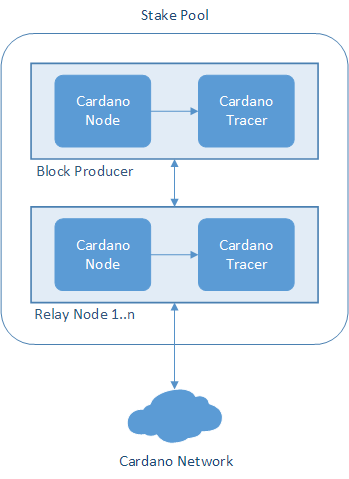
To run an instance of Cardano Tracer, create a bash script to configure options, and then implement a systemd service to run Tracer automatically.
To create and run a startup script and service for an instance of Cardano Tracer:
- On the computer hosting the block-producing node in your stake pool configuration, using a terminal window type the following command to navigate to the folder containing configuration files and scripts related to operating the Cardano Node software:cd $NODE_HOME
Note

You set the
$NODE_HOMEenvironment variable when Installing Shared Libraries. - To retrieve the value of the
$NODE_HOMEand$USERenvironment variables, type:echo $NODE_HOMEecho $USER - Using a text editor, create a file named
startCardanoTracer.shand then add the following contents to the file where<NodeHomeValue>is the value of the$NODE_HOMEenvironment variable that you retrieved in step 2:#!/bin/bash## Set a variable to indicate the file path to the Cardano Tracer configuration file#CONFIG=<NodeHomeValue>/tracer-config.json## Run Cardano Tracer#/usr/local/bin/cardano-tracer--config ${CONFIG} - Save and close the
startCardanoTracer.shfile. - To set execute permissions for the
startCardanoTracer.shfile, type:chmod +x $NODE_HOME/startCardanoTracer.sh - To run Cardano Tracer as a service, using a text editor create a file named
cardano-tracer.serviceand then add the following contents to the file where<UserValue>is the value of the$USERenvironment variable and<NodeHomeValue>is the value of your$NODE_HOMEenvironment variable that you retrieved in step 2:# The Cardano Tracer service (part of systemd)# file: /etc/systemd/system/cardano-tracer.service[Unit]Description = Cardano Tracer ServiceWants = network-online.targetAfter = network-online.target[Service]User = <UserValue>Type = simpleWorkingDirectory = <NodeHomeValue>ExecStart = /bin/bash -c '<NodeHomeValue>/startCardanoTracer.sh'KillSignal = SIGINTRestartKillSignal = SIGINTTimeoutStopSec = 90LimitNOFILE = 32768Restart = alwaysRestartSec = 5SyslogIdentifier = cardano-tracer[Install]WantedBy = multi-user.target - Save and close the
cardano-tracer.servicefile. - To move the
cardano-tracer.servicefile to the folder/etc/systemd/systemand set file permissions, type:sudo mv $NODE_HOME/cardano-tracer.service /etc/systemd/system/cardano-tracer.servicesudo chmod 644 /etc/systemd/system/cardano-tracer.service - To start Cardano Tracer as a service, type:sudo systemctl daemon-reloadsudo systemctl start cardano-tracer.service
- To verify that Cardano Tracer is running, type:sudo systemctl status cardano-tracer.service
- To start Cardano Tracer as a service when the computer boots, type:sudo systemctl enable cardano-tracer.service
- Using a text editor, open the
config*.jsonfile, and then add or edit the following options if needed:..."TraceOptionMetricsPrefix": "cardano.node.metrics.","TraceOptionNodeName": "cardano-node",... - Save and close the
config*.jsonfile. - Repeat steps 1 to 13 on each computer hosting a relay node in your stake pool configuration.
For more details on using Cardano Tracer, see the topic Quick Start.
Challenge | Cardano Tracer supports a significantly more efficient and scalable mode of operation where many Cardano Node instances connect to a single instance of Tracer using SSH forwarding. When the stake pool that you operate is Producing Blocks, configure and implement Cardano Tracer so that all Cardano Node instances connect to the same instance of Cardano Tracer. To monitor all Cardano Node instances in your stake pool configuration using the same dashboard, modify scripts as needed. |
