Registering a Stake Address
In the Cardano ecosystem, you must register on the blockchain the stake address associated with a payment address containing funds that you plan to stake or pledge.
Therefore, you need to create a transaction registering the stake address associated with the payment address containing funds that you plan to pledge to your stake pool.
Figure 1 provides an overview of the process to prepare and submit a transaction using the Cardano Command Line Interface (CLI).
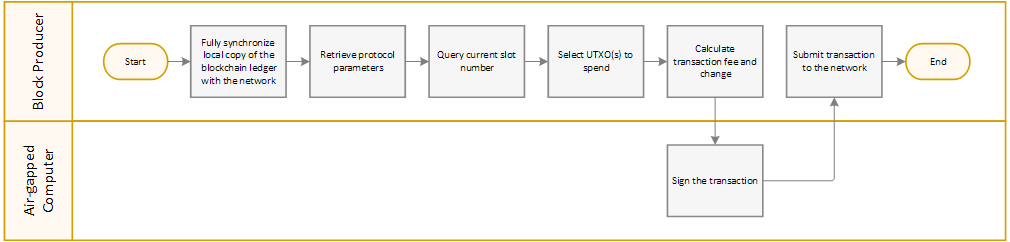
Note | Cardano CLI commands throughout the How to Set Up a Cardano Stake Pool guide may use the |
To register a stake address on the blockchain:
- On the block-producing node, using a terminal window type the following commands to save protocol parameters in a file using JSON format:
cd $NODE_HOME
cardano-cli conway query protocol-parameters \
  --mainnet \
--out-file params.json - To retrieve the amount in Lovelace of the deposit required to register a stake address, type:
stakeAddressDeposit=$(cat $NODE_HOME/params.json | jq -r '.stakeAddressDeposit')
echo stakeAddressDeposit: ${stakeAddressDeposit} - To create a stake address registration certificate, type:
cardano-cli conway stake-address registration-certificate \
  --stake-verification-key-file stake.vkey \
  --key-reg-deposit-amt ${stakeAddressDeposit} \
--out-file $NODE_HOME/stake.cert - To query the slot number of the current tip of the ledger, type:
currentSlot=$(cardano-cli conway query tip --mainnet | jq -r '.slot')
echo "Current Slot: ${currentSlot}"
Note

The
cardano-cli conway query tipcommand uses theCARDANO_NODE_SOCKET_PATHenvironment variable that you set in the$HOME/.bashrcfile when Installing Shared Libraries.cardano-clicommands throughout the How to Set Up a Cardano Stake Pool guide may use theCARDANO_NODE_SOCKET_PATHenvironment variable. If you do not set theCARDANO_NODE_SOCKET_PATHenvironment variable or the environment variable is unavailable, then you need to set the--socket-pathoption explicitly in commands requiring the location of the Cardano Node socket file. - To retrieve the UTXOs available for your payment address and calculate the balance, type:
# Retrieve the list of UTXOs available for your payment address
utxo_json=$(cardano-cli conway query utxo --output-json \
  --address $(cat $NODE_HOME/payment.addr) \
  --mainnet)

# Initialize variables
tx_in=""
total_balance=0

# Loop through the list of UTXOs
while read -r utxo; do
  # Retrieve the values for the current UTXO
  values=$(jq -r --arg k "${utxo}" '.[$k]' <<< "${utxo_json}")
  # Retrieve datum associated with the UTXO
  datum=$(jq -r '.datum' <<< "${values}")
  # Retrieve the reference script associated with the UTXO
  script=$(jq -r '.referenceScript' <<< "${values}")
  # If limits on spending the UTXO may exist, then skip the UTXO
  if [[ ${datum} == 'null' && ${script} == 'null' ]]
  then
    hash=${utxo%%#*}
    idx=${utxo#*#}
    utxo_balance=$(jq -r '.value.lovelace' <<< "${values}")
    total_balance=$((${total_balance}+${utxo_balance}))
    echo "TxHash: ${hash}#${idx}"
    echo "UTXO Balance: ${utxo_balance} Lovelace"
    tx_in="${tx_in} --tx-in ${hash}#${idx}"
  fi
done <<< "$(jq -r 'keys[]' <<< "${utxo_json}")"

echo
echo "Total available balance: ${total_balance} Lovelace"
echo "Final --tx-in string:${tx_in}" - To build a draft transaction for calculating the transaction fee, type:
cardano-cli conway transaction build-raw \
  ${tx_in} \
  --tx-out $(cat $NODE_HOME/payment.addr)+$(( ${total_balance} - 200000 - ${stakeAddressDeposit} )) \
  --invalid-hereafter $(( ${currentSlot} + 10000 )) \
  --fee 200000 \
  --certificate-file $NODE_HOME/stake.cert \
  --out-file $NODE_HOME/tx.tmp
Note
The
--invalid-hereafteroption sets the slot when the transaction expires. The above transaction expires 10,000 seconds—about 2 hours and 45 minutes—after the current slot. - To calculate the fee for the transaction in Lovelace, type:
fee=$(cardano-cli conway transaction calculate-min-fee --output-json \
  --tx-body-file $NODE_HOME/tx.tmp \
  --witness-count 2 \
  --byron-witness-count 0 \
  --protocol-params-file $NODE_HOME/params.json | jq -r '.fee')
echo "Fee: ${fee}"
Note
The
--witness-countoption indicates the number of keys signing the transaction. You must sign a transaction submitting a stake address registration certificate to the blockchain using the secret—private—key for the payment address spending the input, as well as the secret key for the stake address to register. - To calculate change from the transaction, type:
txOut=$(( ${total_balance} - ${fee} - ${stakeAddressDeposit} ))
echo Change: ${txOut}
Note
If change from the transaction is less than 1₳ then funds are insufficient. Transactions having insufficient funds fail when submitted to the network.
- To build the transaction, type:
cardano-cli conway transaction build-raw \
  ${tx_in} \
  --tx-out $(cat $NODE_HOME/payment.addr)+${txOut} \
  --invalid-hereafter $(( ${currentSlot} + 10000 )) \
  --fee ${fee} \
  --certificate-file $NODE_HOME/stake.cert \
--out-file $NODE_HOME/tx.raw - Copy the
tx.rawfile that you created in step 9 to the$NODE_HOMEfolder on your air-gapped, offline computer, and then using a terminal window type the following commands to sign the transaction:cd $NODE_HOME
cardano-cli conway transaction sign \
--tx-body-file tx.raw \
--signing-key-file payment.skey \
--signing-key-file stake.skey \
--mainnet \
--out-file tx.signed - Copy the
tx.signedfile that you created in step 10 to the$NODE_HOMEfolder on the block-producing node, and then using a terminal window type the following command to submit the transaction to the network:cardano-cli conway transaction submit \
--tx-file $NODE_HOME/tx.signed \
--mainnet
Challenge | To display a draft, unsigned or signed transaction in a human-readable format, type the following command where |

Additional Resources
For more details on creating transactions, see Transaction Tutorials and Getting Started with Cardano CLI.