Sending Funds
Figure 1 provides an overview of the process to prepare and submit a transaction in the Cardano network using the Command Line Interface (CLI).
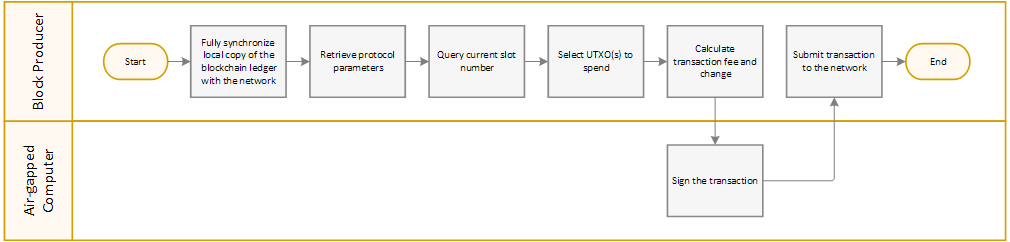
The following procedure shows you how to use Cardano CLI to create a transaction sending ADA to a payment address in the Mainnet environment.
Note | Cardano CLI commands throughout the How to Set Up a Cardano Stake Pool guide may use the |
To send ADA using Cardano CLI:
- On the computer hosting the block-producing node in your stake pool configuration, when the local copy of the Cardano blockchain ledger is fully synchronized with the network, using a terminal window type the following commands to save protocol parameters in a file using JSON format:
cd $NODE_HOME
cardano-cli conway query protocol-parameters \
  --mainnet \
--out-file params.json - To query the slot number of the current tip of the ledger, type:
currentSlot=$(cardano-cli conway query tip --mainnet | jq -r '.slot')
echo "Current Slot: ${currentSlot}" - To simplify creating the transaction, type the following command to assign the amount that you want to send to a variable, where
<SpendingAmount>is an integer representing the amount in Lovelace to send:amountToSend="<SpendingAmount>"
echo Amount to Send: ${amountToSend}Note

The smallest amount you can send successfully is ₳1, which is equivalent to 1 million Lovelace.
- To assign the destination address receiving funds in the transaction to a variable, type the following command where
<ReceivingAddress>is the destination payment address:destinationAddress="<ReceivingAddress>"
echo Destination Address: ${destinationAddress} - To retrieve the UTXOs available for your payment address and calculate the balance, type:
# Retrieve the list of UTXOs available for your payment address
utxo_json=$(cardano-cli conway query utxo --output-json \
  --address $(cat $NODE_HOME/payment.addr) \
  --mainnet)

# Initialize variables
tx_in=""
total_balance=0

# Loop through the list of UTXOs
while read -r utxo; do
  # Retrieve the values for the current UTXO
  values=$(jq -r --arg k "${utxo}" '.[$k]' <<< "${utxo_json}")
  # Retrieve datum associated with the UTXO
  datum=$(jq -r '.datum' <<< "${values}")
  # Retrieve the reference script associated with the UTXO
  script=$(jq -r '.referenceScript' <<< "${values}")
  # If limits on spending the UTXO may exist, then skip the UTXO
  if [[ ${datum} == 'null' && ${script} == 'null' ]]
  then
    hash=${utxo%%#*}
    idx=${utxo#*#}
    utxo_balance=$(jq -r '.value.lovelace' <<< "${values}")
    total_balance=$((${total_balance}+${utxo_balance}))
    echo "TxHash: ${hash}#${idx}"
    echo "UTXO Balance: ${utxo_balance} Lovelace"
    tx_in="${tx_in} --tx-in ${hash}#${idx}"
  fi
done <<< "$(jq -r 'keys[]' <<< "${utxo_json}")"

echo
echo "Total available balance: ${total_balance} Lovelace"
echo "Final --tx-in string:${tx_in}" - To build a draft transaction for calculating the transaction fee, type:
cardano-cli conway transaction build-raw \
  ${tx_in} \
  --tx-out $(cat $NODE_HOME/payment.addr)+$(( ${total_balance} - 200000 - ${amountToSend} )) \
  --tx-out ${destinationAddress}+${amountToSend} \
  --invalid-hereafter $(( ${currentSlot} + 10000 )) \
  --fee 200000 \
--out-file $NODE_HOME/tx.tmp - To calculate the fee for the transaction, type:
fee=$(cardano-cli conway transaction calculate-min-fee --output-json \
  --tx-body-file $NODE_HOME/tx.tmp \
  --witness-count 1 \
  --byron-witness-count 0 \
  --protocol-params-file $NODE_HOME/params.json | jq -r '.fee')
echo "Fee: ${fee}" - To calculate change from the transaction, type:
txOut=$((${total_balance}-${fee}-${amountToSend}))
echo Change: ${txOut}
Note
If change from the transaction is less than ₳1 then funds are insufficient. Transactions having insufficient funds fail when submitted to the network.
- To build the transaction, type:
cardano-cli conway transaction build-raw \
  ${tx_in} \
  --tx-out $(cat $NODE_HOME/payment.addr)+${txOut} \
  --tx-out ${destinationAddress}+${amountToSend} \
  --invalid-hereafter $(( ${currentSlot} + 10000 )) \
  --fee ${fee} \
--out-file $NODE_HOME/tx.raw - Copy the
tx.rawfile that you created in step 9 to the$NODE_HOMEfolder on your air-gapped, offline computer, and then using a terminal window type the following commands to sign the transaction:cd $NODE_HOME
cardano-cli conway transaction sign \
--tx-body-file tx.raw \
--signing-key-file payment.skey \
--mainnet \
--out-file tx.signed - Copy the
tx.signedfile that you created in step 10 to the$NODE_HOMEfolder on the block-producing node, and then using a terminal window type the following command to submit the transaction to the network:cardano-cli conway transaction submit \
--tx-file $NODE_HOME/tx.signed \
--mainnet - To verify that the funds you sent arrived, type the following command to display the list of Unspent Transaction Output (UTXOs) available for the payment address receiving funds in the transaction, and then find the UTXO for the funds that you sent:
cardano-cli conway query utxo --output-json \
  --address ${destinationAddress} \
  --mainnet
The UTXO query displays JSON output similar to the following—where the key is the transaction hash, followed by a hash (#) character, and then followed by the transaction index—displaying the value of the UTXO in Lovelace:
{
  "4f26e87038f6657ea9429732685c43525685506816420dc5f0e50c692d3387e6#0": {
    "address": "addr_test1qzkdq88knvkrycp40zv9mtdejqqjqwklvzcjmvlj8erjgx5q628ecngj4yjr4dmtfqwj76qcqrwclgwvn39hm4hcy9eqcsza02",
    "datum": null,
    "datumhash": null,
    "inlineDatum": null,
    "inlineDatumRaw": null,
    "referenceScript": null,
    "value": {
      "lovelace": 9997654786
    }
  }
}